


Unfortunately, I have missed one return deadline too many. So I built a ChatGPT return tracker. A Scheduled Task scans my inbox for online purchases, flags upcoming return deadlines and sends reminders to my phone. When I decide to send something back, a reusable Start Return skill finds the order, opens the retailer’s return portal and retrieves the QR code or shipping label. This is a quick, real-life example of the kind of Scheduled Task I covered in How to Automate Tasks with ChatGPT or Claude: A Beginner’s Guide.
How my ChatGPT return tracker works
The “Return Monitor” task scans my inbox every morning for new online purchases and relevant order updates. I have it look for order confirmations, shipping notices, delivery emails, and return confirmations. If a retailer starts its return window on the delivery date rather than the purchase date, the delivery email helps it calculate the correct deadline.
I have also configured it to:
Exclude retailers that I would rarely make returns to including Amazon, Target, grocery stores, etc. I can always refine these filters later if my behavior changes.
Track the retailer, order number, item, delivery date and return deadline.
Distinguish between a deadline stated directly in an email and one inferred from a retailer’s published return policy on their website.
Flag anything ambiguous for my review, such as final sale merchandise or special holiday return windows, rather than guessing.
Remind me 7 days and 2 days before the return window closes.
Stop tracking an item as soon as I tell it I’m keeping it.
No spreadsheets. No starred emails. No to-do list. My system finds the purchases and surfaces the decision to me at the moment I actually need to make it.
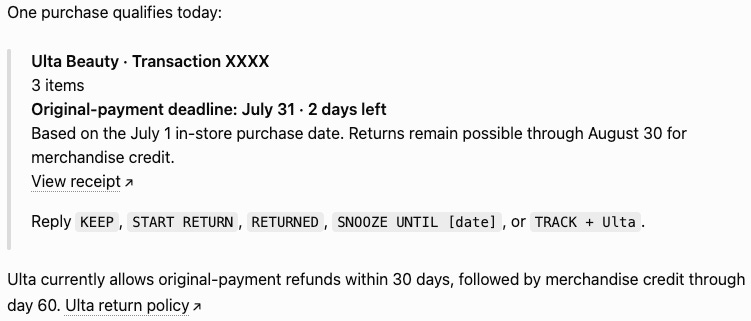
The most important reminder happens after I start the return
Starting a return and completing it are, unfortunately, two different tasks. Especially those of us who live in NYC and must haul packages to the UPS store on foot. I unfortunately know from experience that I’m capable of requesting a return, generating the QR code, taping the box shut and still leaving it sit in my apartment collecting dust, saying I’ll “return it tomorrow” until the drop-off deadline passes (no judgment please).
This tracker does not consider the job finished once the label exists. It continues reminding me of the drop-off deadline (which is sometimes something like seven days after the QR code was generated) until I confirm I actually dropped it off.
This was the task that finally convinced me to ChatGPT notifications on my phone. A drop-off reminder is only useful if I see it before I leave the house, not the next time I open my computer.

I added a “Start Return” ChatGPT Skill to finish the job
My Scheduled Task itself handles the memory, monitoring, and timing. A custom skill handles the return request itself.
Skills are reusable workflows that teach ChatGPT or Claude how to complete a particular job. You can invoke the skill at any time in a chat. They can include step-by-step instructions, preferences, decision rules, and conditions for when the AI should stop and ask for clarification.
Scheduled tasks are useful for work that should happen repeatedly or at a particular time. Skills are more on-demand. The benefit is, instead of explaining the same process to ChatGPT every time, I can invoke a workflow I have already taught it.
In this case, when my tracker reminds me that a return deadline is approaching, I can respond:
Start Return for the navy dress.
The Start Return skill then:
Finds the right order confirmation, shipping, or delivery email.
Confirms which item I meant if it cannot confidently identify it within an order containing multiple products.
Opens the retailer’s official return portal.
Works through the return process.
Applies my saved preferences.
Retrieves the final QR code or shipping label (and in the future, will send it to my printer!)
If it encounters a choice it cannot safely make from my existing preferences, it will pause and ask for my clarification and approval.
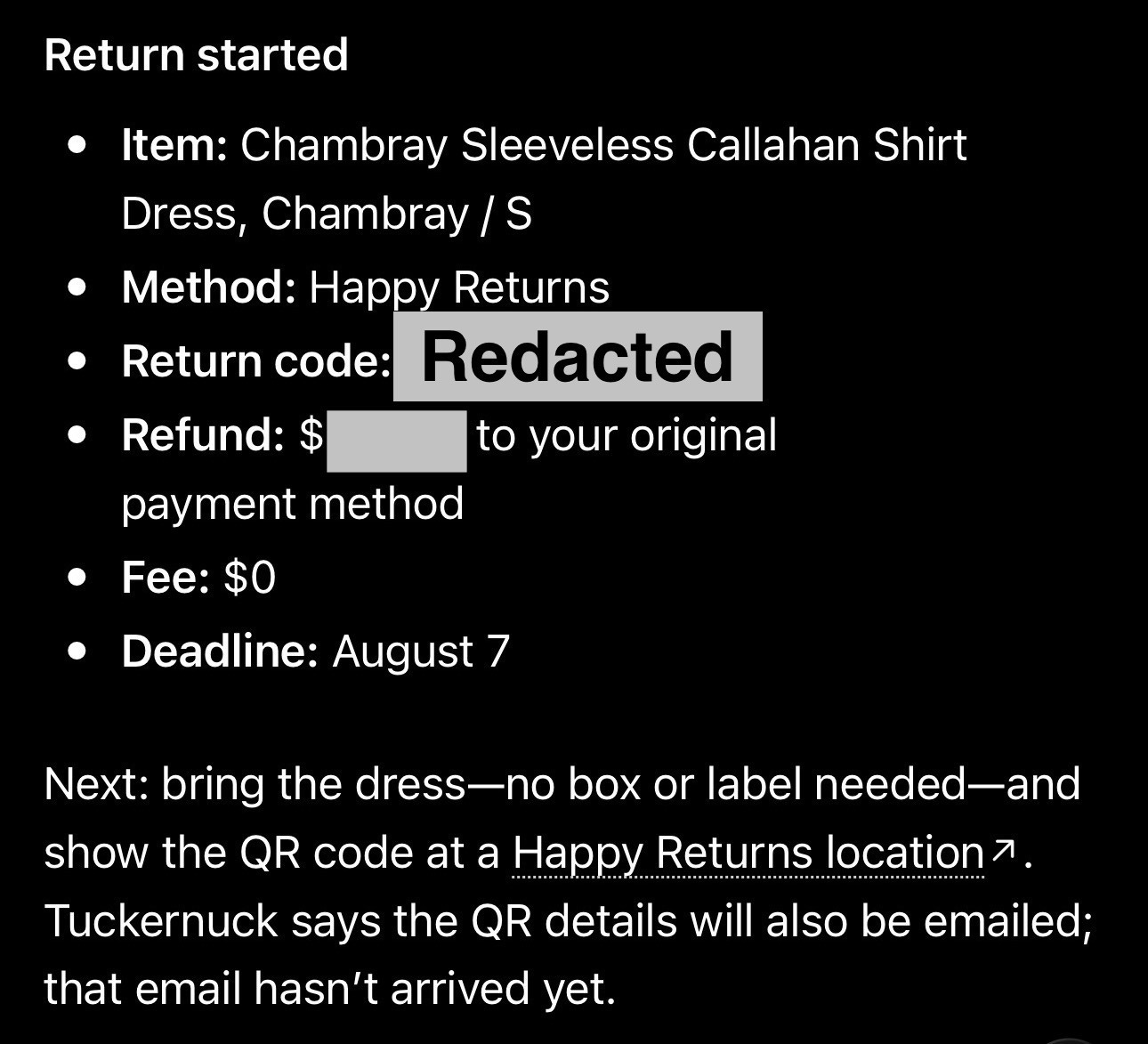
I preconfigured my return preferences
In teaching the system how I usually make return decisions, I can make the process more autonomous rather than asking me a bunch of follow-up questions. I saved the following preferences and instructions:
My preferred return methods are: Happy Returns > QR code that I can bring to a drop-off location > Printed shipping label.
My preferred refund method is always original payment method instead of store credit (and if original payment method isn’t available, the AI should pause and ask me what to do next).
Tell me when returning something in person could avoid a shipping label fee.
Choose a return reason related to “fit” of the item. If that’s not available, ask me how to proceed.
Pause and ask me for clarification if my preferred options are not available.
These instructions are what actually save me time in the Start Return process. If I had to answer every question for the AI, I might as well have completed the return form myself.
The first attempt wasn’t perfect
The first time I used Start Return, it missed one of the available return methods. It told me Happy Returns wasn’t available and that my only option was a UPS shipping label I would need to print. I could see Happy Returns selected as the default option on my screen, so I sent ChatGPT a screenshot and asked it to try again. The second attempt worked, and it completed the return correctly. Within minutes, I had a Happy Returns QR code in my inbox.
Afterward, I asked ChatGPT to update the skill based on what had gone wrong. It summarized its proposed changes and waited for my approval. When I forgot to approve the changes, it even sent me a push notification the next morning saying the task needed my attention.
That small repair loop of showing it what it missed, asking it to retry, and then folding the lesson back into its instructions, is what got the skill back on track and will make it more durable in the future.
How does ChatGPT click through an online return portal?
ChatGPT and Claude can use a built-in browser to open web pages, click buttons, enter information, inspect what is on the screen, and move through a website.
How can it do this? Computer Use.
Computer Use allows ChatGPT and Claude to see and operate interfaces like web browsers and desktop apps that don’t have a direct integration.
A good way to think about these capabilities is:
Skills are playbooks
Computer Use provides the hands
Scheduled Tasks provides the clock
I don’t own a printer, but I’m planning on getting one to test a final step in this skill that triggers the label printing.
Why ChatGPT cannot complete every online return
Be aware that AI will likely not be able to handle every return. Unfortunately, the world of internet browsers has not fully caught up to AI surfing the web. For years, websites have been built to explicitly block bot traffic. So, sometimes it gets suspicious of AI computer usage as being a bot. Retailer websites may present CAPTCHA challenges, two-factor authentication, email verification links, or other bot detection systems.
My built-in rules for this skill direct the AI to pause and ask me for clarification if it encounters challenges successfully navigating the retailer’s website.
A quick privacy PSA
As AI becomes more connected to our inboxes, files, browsers, and other personal systems, it’s worth spending a few seconds reviewing your data settings in your AI provider.
I personally keep model training turned off on my consumer AI accounts.
For ChatGPT:
Profile → Settings → Data Controls → turn off “Improve the model for everyone.”
OpenAI says new conversations will remain in your chat history but will not be used to train its models after this setting is disabled. You can review the current instructions in OpenAI’s Data Controls FAQ.
For Claude:
Name → Settings → Privacy → turn off “Help Improve Claude.”
Anthropic’s current instructions are available in its Model Improvement privacy settings guide.
Turning off model training is not the same thing as preventing the service from processing or retaining any data required to complete your request. I also recommend reviewing which apps and accounts you have connected and giving each AI system only the access it actually needs.
What this system gives me
Now instead of relying on myself to remember which packages need to go back and when each deadline is, I have a system that keeps track of it for me and helps me take the next step. My alerts even calculate the money at stake for the return. That is the kind of AI system I want to keep building: not something that replaces my judgment, but removes the repetitive tasks that quietly consume my attention and that I’m most likely to defer.
This is exactly what I need but have never had the time to figure out how to set everything up. Thank you for this!!!!
I will work on setting this up for myself! This is perfect!💕